
Documents
Finding Your HOA Documents in the Online Portal
Access Your Community Documents Anytime
The Homeowner Portal makes it easy to access important Association documents whenever you need them. Whether you're looking for your community's CC&Rs, meeting minutes, architectural forms, financial information, or insurance documents, everything is organized in one convenient location.
This guide will walk you through how to locate and download your HOA documents using the Homeowner Portal.
Try the Owner’s Portal Chat-Bot First
Looking for a specific document? The Chat-Bot can help you find it quickly!
Simply ask the chatbot for the document you're looking for—for example, "Where can I find my CC&Rs?" or "How do I access the meeting minutes?" The chatbot can guide you to the correct location in the Homeowner Portal or direct you to the appropriate Help Center article.
If you still can't find what you need, continue with the steps below to browse your Association's documents manually.
Step 1: Log In to the Homeowner Portal
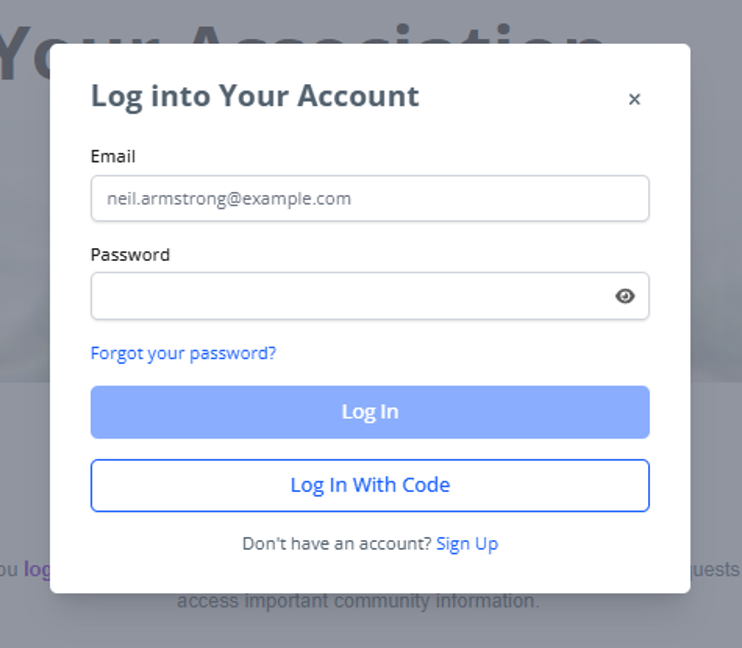
Begin by signing in to your Homeowner Portal account.
Visit home.virtualhoa.com.
Enter your email address and password.
Click Sign In.
Don't have portal access?
If you haven't registered yet or need assistance accessing your account, please contact VirtualHOA.com at info@virtualhoa.com for help.
Step 2: Navigate to the Documents Section
Once you're logged in:
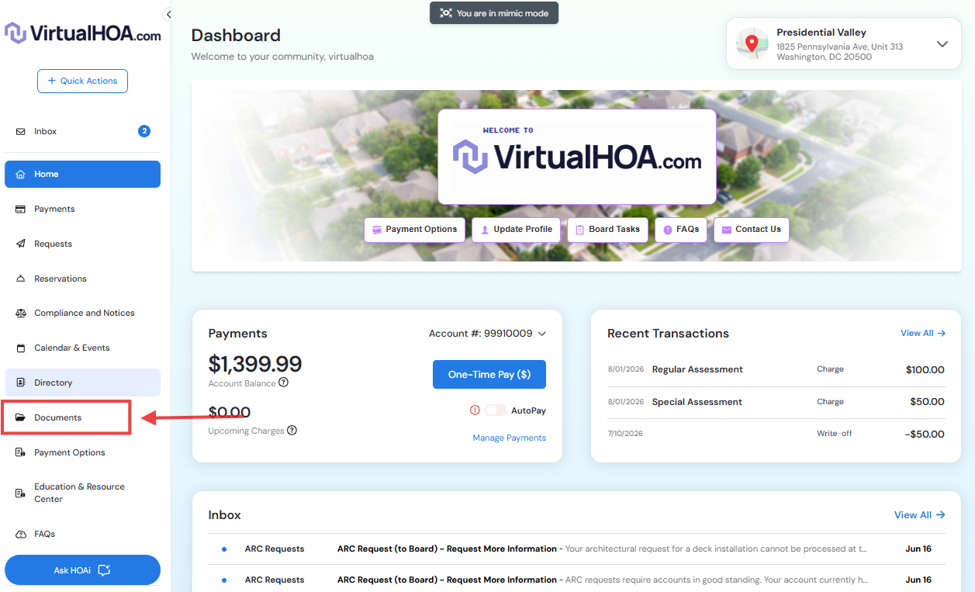
Locate the Documents tab in the navigation menu.
This section is typically found in the left-hand sidebar of the Homeowner Portal.
Click Documents to view your Association's available files.
Step 3: Browse Available Document Folders
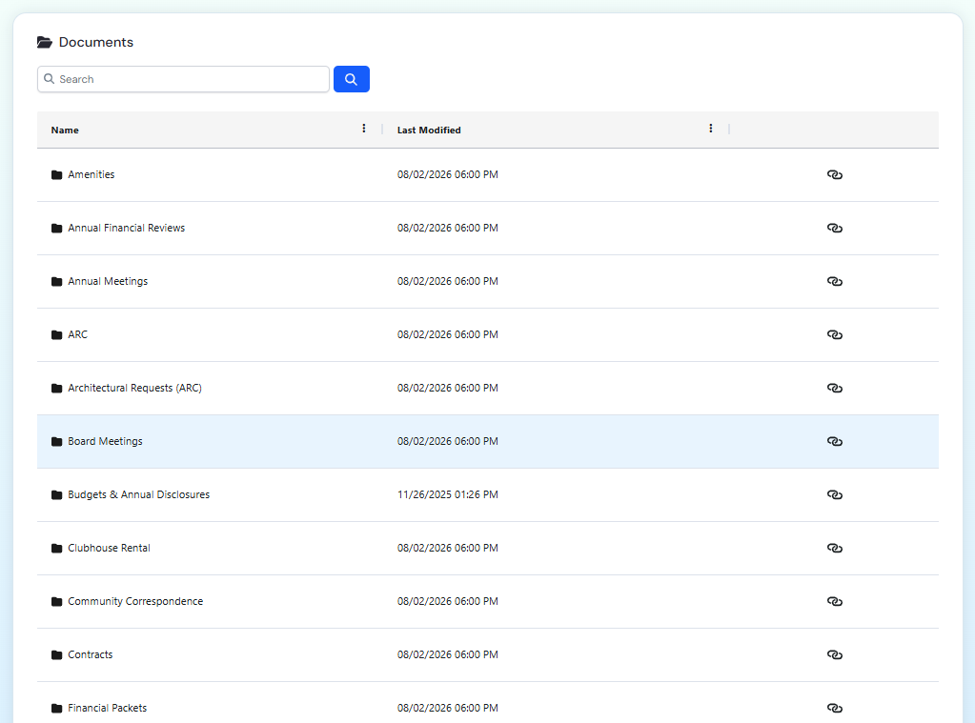
Documents are organized into folders to make them easy to find.
Depending on your community, you may see folders such as:
Governing Documents
Contains your Association's governing documents, including:
CC&Rs (Covenants, Conditions & Restrictions)
Bylaws
Rules & Regulations
Other governing policies
Financial Information
May include:
Annual budgets
Financial statements
Reserve study information
Annual disclosures
Forms
Find commonly used homeowner forms, such as:
Architectural Review (ARC) Applications
Maintenance request forms (if applicable)
Other Association forms and applications
Meeting Materials
Access Board-related documents, including:
Meeting agendas
Approved meeting minutes
Board notices
Annual meeting information
Community Information
Stay informed with documents such as:
Community newsletters
Announcements
Educational materials
Resident resources
Insurance
Review documents related to your Association's insurance coverage, including:
Insurance summaries
Policy information
Certificates of insurance (when available)
Note: The documents available may vary depending on your Association and the permissions assigned to your account.
Step 4: Open or Download a Document
Once you've located the document you need:
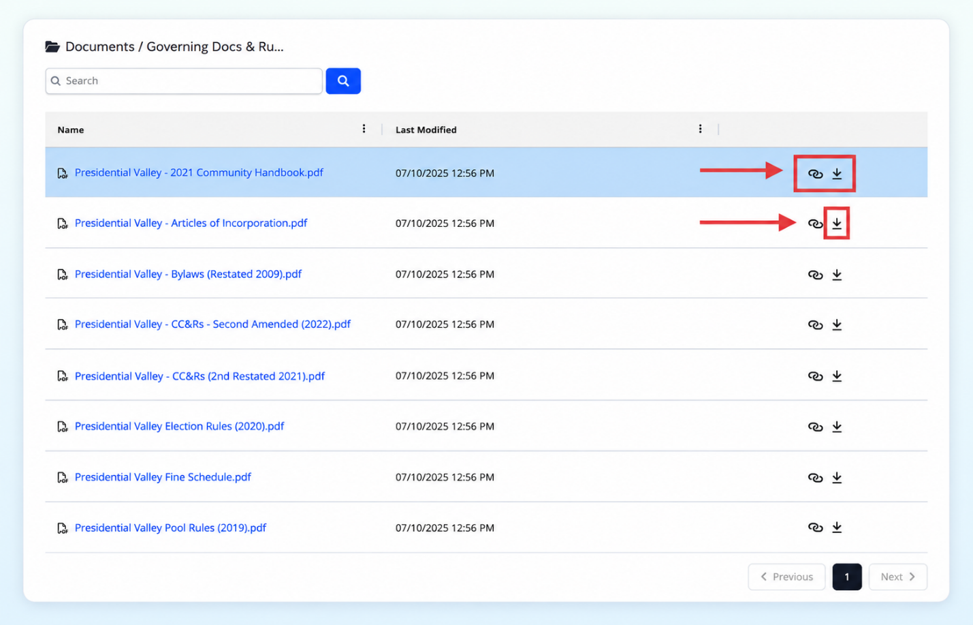
· Open the appropriate folder containing the document you need.
· Click the document name to preview it.
· To download the document, click the Download icon (downward arrow) on the right. The file will begin downloading automatically.
Most Association documents are provided in PDF format and can be saved to your device or printed for your records.
Frequently Accessed Documents
If you're looking for a specific document, here are some common locations:
Document |
Where to Find It |
CC&Rs |
Governing Documents |
Bylaws |
Governing Documents |
Rules & Regulations |
Governing Documents |
Annual Budget |
Financial Information |
Financial Statements |
Financial Information |
ARC Application |
Forms |
Meeting Minutes |
Meeting Materials |
Insurance Information |
Insurance |
Tips for Finding Documents
If you're unable to locate a document:
Browse related folders, as some documents may be organized differently depending on your community.
Use the search feature, if available in your portal.
Make sure you're logged into the correct homeowner account if you own multiple properties.
Refresh the page if new documents were recently uploaded.
If a document is not available, it may not have been uploaded to the portal or may only be available upon request.
Need Assistance?
If you're having trouble finding a document or accessing the Homeowner Portal, our management team is happy to help.
Please contact us if:
You cannot locate a specific document.
You need assistance logging into your account.
You believe a document is missing.
You have questions about which document you need.
We're here to help you access the information you need as quickly as possible.
Helpful Reminder
The Homeowner Portal is the easiest way to access your Association's documents 24/7. We recommend checking the portal before requesting copies, as many of the most commonly requested documents are available for download at any time.